


Bump Pulse: Contraction Timer
4.69.00 Reviews
App Specs
- Version
- 3.5.0
- Updated On
- License
- Free
- Downloads
- 10,000+
- Developer
- Developer On Wheels
- Categories
- Parenting
- Platform
- Android
Screenshots
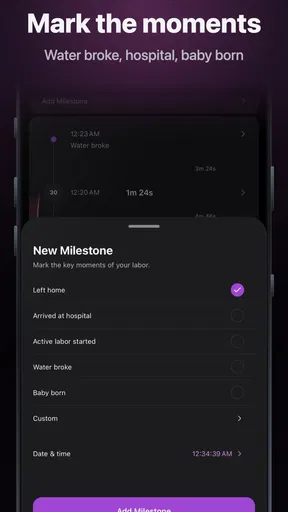
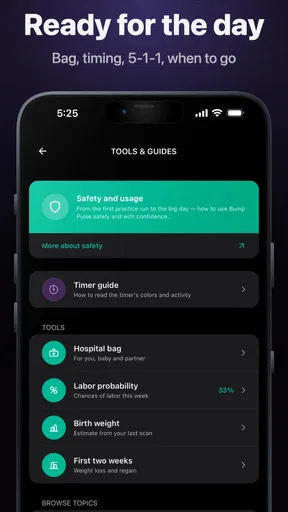
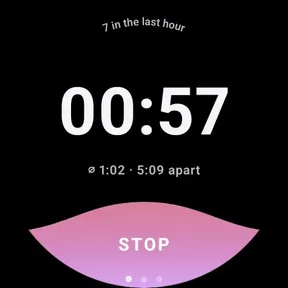
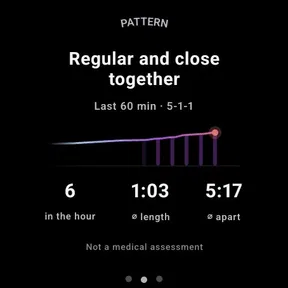
 Analysis by AppCompare
When labor starts, the hardest part is often not knowing what to do next. It is keeping track of what is happening while trying to stay calm, support the person giving birth, and make sensible decisions. Bump Pulse is built for that narrow but important moment: it is a parenting app that records contractions, measures their timing, and lets a partner follow along live. I found its appeal less in decoration and more in reducing the need to remember details when attention is already stretched.
The app comes from Developer On Wheels and is free to install, with optional purchases priced at $3.99 per item. It is rated for Everyone, runs on Android 7.0 or later, and the current release is version 3.4.2. Its average score is 4.6 from roughly 95 ratings, while its reach is still modest at over 10K installs. Those figures suggest a focused tool rather than a broad pregnancy platform, and that is exactly how I would approach it: as a dedicated contraction timer, not as a complete guide to pregnancy or medical care.
From the first contraction to a shared labor record
I’d start by getting comfortable with the timer before labor, when there’s no pressure to capture every moment. That makes it easier to decide who will operate the phone and what the partner should do with shared updates. From there, the useful question is how a simple record can support coordination without becoming a substitute for checking in with each other or following care-team guidance.
The starting condition: one person notices a pattern
The most useful time to understand a contraction timer is before it becomes urgent. I would install Bump Pulse during late pregnancy, open it once in a calm moment, and make sure both people who may use it know where the timing controls are. That small preparation matters because labor is not a good time to explore an unfamiliar interface or decide who should hold the phone.
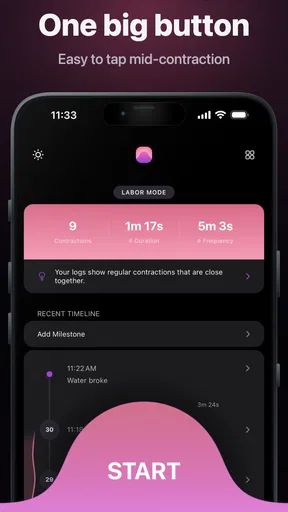
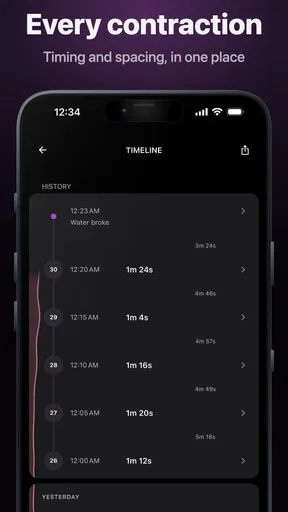
The person experiencing contractions can use the app as the primary recorder. When a contraction begins, the timer can be started; when it ends, it can be stopped. Repeating this creates a running picture of duration and the gap between contractions. That is more dependable than trying to estimate intervals from memory or writing times down on paper while also offering physical and emotional support.
In practice, the first few entries may feel unnecessary. Early contractions can be irregular, and the temptation is to start timing only when they become painful. I think that is a mistake. A consistent record from the beginning gives you a better sense of whether the pattern is changing, while still leaving room to ignore isolated entries that do not reflect the broader progression.
The key habit is to record consistently, not perfectly. If a start or stop is a little late because the person needs help changing position, that entry is still more useful than no record at all. The app should support judgment, not create another source of pressure.
Worth Reading Before You Choose

EA SPORTS FC Mobile 26 Is a Bigger Football Game, but It Takes Time

Flipboard Shows What News Apps Must Do Beyond the Feed

Switching to Android Auto Means Rethinking Your Driving Routine

Google Calendar Makes a Crowded Week Easier to Manage

Ludo King Makes the Most of the Minutes Between Plans

Baby Panda World Brings Quick Play to Modern Phones, but Its Game Library Feels Busy
A simple step-by-step flow
The basic workflow is deliberately easy to understand. Start the contraction when it begins, stop it when it eases, and repeat the process for the next one. The app then serves as a counter and timer, helping you see both how long individual contractions last and how much time passes between them.
I recommend assigning one person to operate the phone whenever possible. If the laboring person has to reach for the device during every contraction, the tool becomes a distraction. A partner can watch for the beginning and end, but should avoid turning the process into an interrogation. A quiet tap and a quick glance are usually better than repeatedly asking, “Is it over yet?”
There is also a practical reason to keep the recording routine simple: contractions do not always arrive in a neat rhythm. A timer that encourages you to capture each event without demanding interpretation is more useful than one that makes you analyze every irregularity. Bump Pulse fits that role well because its central purpose is recording the sequence rather than replacing a clinician’s advice.
For a realistic evening scenario, imagine contractions beginning after dinner. The first few are far enough apart that the couple can continue talking, but close enough to make them wonder whether labor is developing. One person starts and stops the timer while the other rests. After several entries, they can look back at the pattern instead of debating individual sensations. If the pattern becomes more regular, they have a clearer record to discuss with their maternity team; if it fades, they have avoided relying on a single memorable contraction.
What the partner-sharing workflow changes
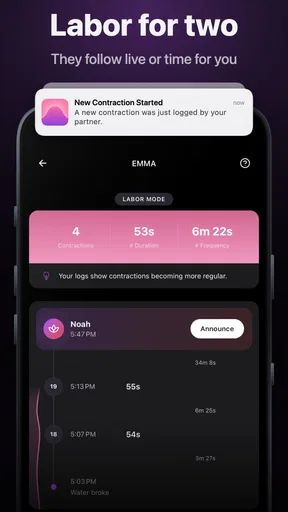
The live partner-sharing feature is the part that gives this app a distinct practical advantage. A partner does not have to stand beside the laboring person for every contraction to remain informed. That can be helpful when one person is at work, arranging transport, caring for another child, or handling a hospital bag while the other continues timing.
This handoff works best when responsibilities are agreed in advance. The person closest to the labor can focus on starting and stopping contractions, while the remote partner watches the shared progress and prepares for the next decision. The remote person should not treat the shared display as permission to direct labor from a distance, though. Live information supports coordination; it does not provide enough context to make medical decisions by itself.
Sharing also creates a useful division between recording and responding. One person may be better at using the phone, while another is better at calling the care provider, checking transport, or looking after siblings. Bump Pulse can fit into that division because the contraction record does not have to stay on one device in one person’s hands.
There is an emotional benefit too. A partner who cannot be physically present may feel less helpless when there is a live way to follow the timing. At the same time, I would set boundaries before labor: decide who should receive updates, how often the remote partner should check in, and when a phone call is more appropriate than another message or glance at the shared record.
Turning the record into an outcome
The outcome is not a diagnosis. It is a clearer account of what has been happening. That account can help a couple describe the pattern to a midwife, doctor, or hospital staff member without relying on vague phrases such as “they seem closer together now.” It can also help the partner organize practical steps at the right time instead of reacting to every contraction as if it were an emergency.
I especially like the distinction between the app’s role and the care team’s role. A contraction timer can tell you what was recorded. It cannot assess pain, bleeding, fluid loss, fetal movement, pregnancy complications, or any other clinical concern. If the care team has given specific instructions, those instructions should take priority over whatever pattern appears on the screen.
For that reason, I would keep the app open as a record-keeping aid, but I would not use it as the sole reason to delay contacting a professional. A pattern can be useful information without being a safety rule. This is an important limitation, but it is also a sensible boundary for any app in this category.
Small workflow tips that make it more useful
First, choose the primary timer operator before contractions become intense. Switching between two people can lead to missed starts, duplicate entries, or uncertainty about which device reflects the current record. If the primary person needs a break, make the handoff explicit rather than simply passing the phone over.
Second, keep the device available but not intrusive. A phone placed within easy reach is better than one buried in a bag, but constant checking can make early labor feel more urgent than it is. Let the app collect the pattern while the couple concentrates on breathing, comfort, hydration, and the care plan already agreed with their provider.
Third, use the shared view as a coordination tool rather than a scoreboard. A partner who sees the timing can prepare to travel or make a call, but should still ask how the laboring person feels. The numerical pattern is only one part of the situation, and sometimes the person’s condition matters more than whether the intervals look familiar.
Fourth, establish a backup communication plan. Live sharing is convenient, but labor decisions should not depend on a partner noticing an update instantly. If the situation changes quickly, a direct call or the appropriate emergency service is more reliable than waiting for someone to open the app.
Where the flow breaks down
The first point of friction is human attention. During a strong contraction, pressing the correct control may be the last thing someone wants to do. That means the app’s usefulness depends heavily on having a calm, capable operator nearby or on the laboring person being comfortable with the process. It is not a fully automatic monitor, and it cannot infer a contraction that nobody records.
Irregular labor is another challenge. Early contractions may stop and start, vary in intensity, or feel different from one another. A clean list of times can look more authoritative than it really is. I would resist the urge to interpret every change as a milestone. The record is most valuable when discussed alongside symptoms and professional guidance.
Partner sharing can introduce its own friction. A remote partner may check too often, worry over normal variation, or assume that a shared update means immediate action is required. The feature solves distance, but it does not solve communication. A short agreement about responsibilities can prevent the app from creating more messages and anxiety than it removes.
There is also a trade-off between specialization and breadth. Bump Pulse appears designed around contraction timing and partner coordination, which keeps the main task focused. Someone looking for extensive pregnancy education, appointment management, fetal development information, or a broad health journal would probably be better served by a larger pregnancy companion app. That kind of app may offer more content, but it may also be less direct when all you need is a quick timer.
Likewise, users who prefer pen and paper may not gain much from switching. A notebook can record times without depending on a phone, and a basic timer may be enough for someone whose partner is always present. Bump Pulse earns its place when you want a structured record and the ability to keep another person informed, not simply because every labor needs an app.
Who should use it, and who should skip it
I would recommend Bump Pulse to expectant parents who want a dedicated contraction tracker, especially couples who may be separated during early labor or who want to divide timing and practical preparation between them. It is also a reasonable choice for someone who finds handwritten notes confusing when contractions become more frequent.
It is less suitable for anyone expecting medical interpretation, automatic detection, or a complete birth-planning system. It should also be skipped as a primary tool if using a phone increases stress, if the device is unreliable, or if the care team has instructed you to follow a different monitoring process. The app is free to start, but optional purchases at $3.99 per item are worth considering before depending on any paid element during labor.
The Everyone age rating makes it broadly accessible, but that does not change the intended audience: adults and families preparing for childbirth. The Android requirement is also practical to check before installation; phones running an older system than Android 7.0 will not fit the stated compatibility range. For iOS users, I would confirm the current availability and device compatibility in the relevant store before making it part of a birth plan.
My final assessment after following the full workflow
Bump Pulse succeeds because it concentrates on a real problem: remembering contraction timing while life around the labor continues. Starting with the first contraction, repeating the same simple action, sharing the record with a partner, and using the resulting pattern to support a conversation with a care provider is a coherent workflow.
Its strongest feature is not the timer alone. It is the handoff between the person recording events and the partner preparing to respond. That makes the app more useful than a basic stopwatch for couples who need coordination across distance or across different tasks. The trade-off is that every entry still depends on a person, and every interpretation still requires common sense and professional guidance.
With over 95 ratings and a 4.6 average, it has earned encouraging feedback while remaining a relatively small app. I see that as consistent with its focused purpose rather than a weakness. If you want a straightforward parenting utility for contraction timing and live partner awareness, I would give it a trial before labor and decide together how you will use it. If you want a full pregnancy information hub or a medical decision-maker, choose something broader and keep Bump Pulse, if at all, as a supporting timer rather than the center of your care plan.
Pros
- Simple one-tap controls make timing contractions quick and effortless.
- Clear interval history helps identify changes in contraction patterns.
- Useful for tracking early labor without complicated medical terminology.
- Lightweight app should require minimal storage and battery resources.
- A focused design keeps attention on timing rather than unnecessary features.
Cons
- Not a substitute for medical advice or professional labor monitoring.
- Manual timing can be inaccurate if contractions are difficult to distinguish.
- Limited value for users seeking detailed pregnancy or delivery guidance.
- Data may be lost if the app lacks reliable backup or synchronization.
- Interface usefulness depends on consistent entries during stressful moments.
FAQs for Bump Pulse: Contraction Timer
What is Bump Pulse: Contraction Timer used for?
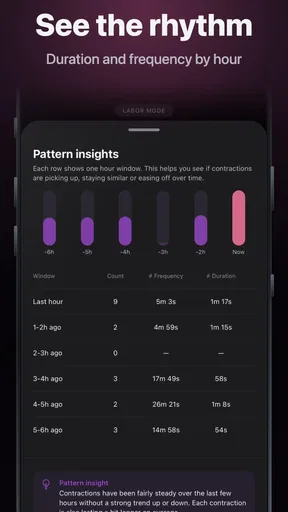
Bump Pulse: Contraction Timer is designed to help expectant parents record and monitor labor contractions. After starting a contraction, you can stop the timer when it ends and review information such as duration, frequency, and intervals. This can make it easier to recognize patterns over time and communicate useful details to a midwife, doctor, or hospital team.
How do I track contractions with Bump Pulse?
Using the app is generally straightforward: tap the start button when a contraction begins, then tap again when it finishes. The app records the timing and builds a history of your sessions, allowing you to observe whether contractions are becoming longer, stronger, or closer together. It is best to keep your phone accessible and use the same process consistently.
Can Bump Pulse tell me when I should go to the hospital?
Bump Pulse can help you organize contraction timing, but it should not be treated as a medical decision-making tool. Labor experiences vary, and recommendations can depend on your pregnancy, medical history, distance from care, and your provider’s instructions. Always follow the guidance given by your healthcare professional, and contact them immediately if you have concerns or warning signs.
Does Bump Pulse: Contraction Timer work without an internet connection?
The basic timing function may be useful even when you are offline, since starting and stopping a timer does not normally require continuous internet access. However, features such as synchronization, account services, updates, advertisements, or sharing data could depend on connectivity and the app’s current configuration. Check the app’s permissions and store listing for the latest offline and privacy details.
Is Bump Pulse: Contraction Timer safe and private to use?
The app can be a convenient way to record personal labor information, but users should review its privacy policy and requested permissions before entering sensitive details. Avoid assuming that app data is a substitute for your medical records, and consider who may access shared reports or phone backups. For medical emergencies, severe pain, bleeding, reduced fetal movement, or other urgent symptoms, contact professional care rather than relying on the app.


